
Nekopoi APK v2.5.4.7 Download Latest Android [November 2026]

Nekopoi is an Android app for watching anime specifically for adult audiences, complete with Indonesian subtitles. This page provides the latest APK file, along with our own verified file data and easy to follow installation instructions.
Application Summary
- Free
- No root
- Android 6.0+
18+ Only for users aged 18 years and over.
Table of contents
- Getting to know Nekopoi APK
- Nekopoi Feature Highlights
- Quick Tour of the App Menu
- Latest Release Notes
- How to Install Nekopoi APK on Android
- Required Phone Specs
- Nekopoi APK on Laptop and PC
- Nekopoi on iPhone and iPad
- Nekopoi Pros and Cons
- Safety Check Before Installing
- Official Similar Apps
- Daily Usage Tricks
- Final Words
- Frequently Asked Questions
Nekopoi APK Information
| Name | Nekopoi |
| Package name | com.kcstream.cing |
| Category | Entertainment, video player |
| Version | v2.5.4.7 |
| Size | 29.5 MB |
| Need Android | Android 6.0+ |
| Developer | Nekopoi |
| Price | Free |
| Text language | Indonesian |
| Age rating | 18+ |
| Available on Play Store | No |
| Last checked | November 2026 |
18+ Only for 18+ users. This app is only for users aged 18 or older. If you are under that age, please leave this page.
Getting to know Nekopoi APK
Nekopoi APK is an installation package for the Nekopoi app on Android phones. Its function is simple: stream anime series and films online, with Indonesian subtitles displayed directly on the screen. Because it targets an adult audience, this app is only suitable for use by those 18 years of age or older.
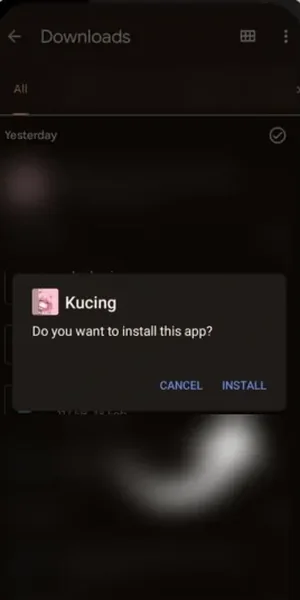
When installed, Android displays the name Kucing in the installation dialog, and its package name com.kcstream.cing . These two things are useful for identifying the original file. If the installation dialog displays a different name or asks for strange permissions, the file has likely been modified.
Nekopoi is not sold through any app stores. Everyone downloads the APK file and installs it themselves, so it's important to know which version is the most recent. The current version we provide is v2.5.4.7 with a size of 29.5 MB, and we recheck the data monthly. The last check was recorded: November 2026.
The app is lightweight and requires no registration. You don't need to create an account, link an email, or enter any personal information. All settings, bookmarks, and history are stored in your phone's memory.
Nekopoi Feature Highlights
Here are the features you'll notice most when using the app daily. All menu names below are taken from the latest version of the app.
Built In Indonesian Subtitles
Most titles already have Indonesian subtitles, so there's no need to search for a separate file. The text appears immediately from the first second, and remains legible on mobile screens.
A to Z Title Index
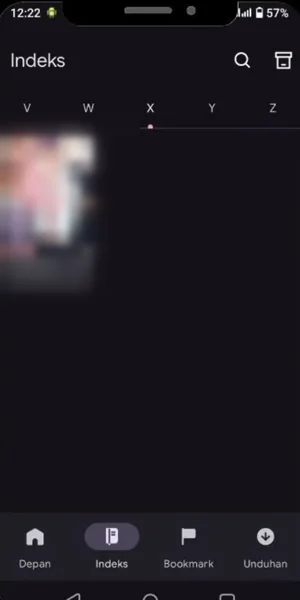
The Index menu sorts all titles by first letter. Simply tap a letter in the top bar, and the list jumps directly to that section. This is faster than scrolling through a long homepage.
Bookmark for Favorite Titles
Titles you want to follow can be bookmarked and collected in the Bookmarks tab. The Settings menu also has a backup and restore button for bookmarks, so you don't lose your favorites list when you change phones. For more details, see the favorites and history guide .
Download Tab to Watch Without Signal
Episodes can be saved in advance and then played from the Downloads tab when there's no connection. This feature is helpful when your data plan is low or you're traveling to a location with a weak signal.
PIN and Fingerprint Lock
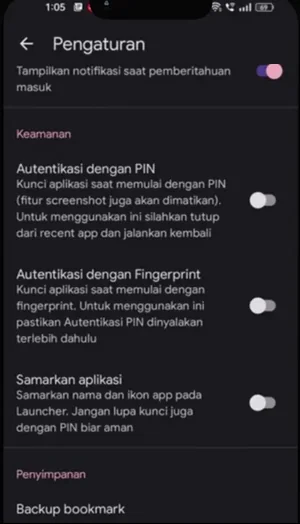
In the Security section, the app can be locked with a PIN or fingerprint each time it's opened. When the PIN lock is active, the app also prevents screenshots, preventing the app from being shared easily.
Disguise Name and Icon
The Disguise app option changes Nekopoi name and icon in the app drawer. For those whose phones are frequently shared, this feature maintains privacy without having to manually hide the app.
Customizable Notifications
New release notifications can be turned on or off from the Settings menu. For added peace of mind, simply turn them off and open the app occasionally to see the latest updates.
Video Resolution Options
The player offers several quality levels. Lower resolutions are more data and battery efficient, while higher resolutions are sharper when used on stable WiFi.
No Account and No Fees
There's no registration form or mandatory subscription. If anyone asks for payment for a specific version, assume it's a scam and don't proceed.
Small File Size
With a size of around 29.5 MB, the download and installation process takes only a short time. Even phones with limited memory can handle it. We covered tips for such devices in our article on low RAM phones .
Quick Tour of the App Menu
When first opened, Nekopoi immediately displays the Home page without a registration screen. The main navigation is located on the bottom bar, which contains four tabs. Here's what each tab does so you don't have to guess.
| Tab | The contents |
|---|---|
| Front | List of latest releases and trending titles, updated automatically |
| Index | All titles are arranged alphabetically, with a letter bar at the top. |
| Bookmark | The titles you bookmark are saved in your phone's memory. |
| Downloads | Episodes that have been saved to play without internet |
The three line icon in the top left corner opens the side menu, from which you can access Settings. The Settings menu is divided into three sections. Notifications manages new release notifications. Security includes a PIN lock, fingerprint lock, and the option to disguise app names and icons. Storage includes a button for backing up and restoring bookmarks.
We recommend three things on day one: enable PIN lock if you're sharing your phone, back up your bookmarks once your favorites list starts to fill up, and set your video resolution according to your data plan. These three things only take a minute or two, but they make everyday use much more peaceful.
The magnifying glass icon at the top opens a search bar. Type only part of the title, such as the first two or three words, as the spelling of the title often differs between translations and the original name.
Latest Release Notes
The Nekopoi team rarely writes changelogs for each release, so we won't be compiling version notes. The buttons on this page always point to the v2.5.4.7 file, the latest version available at the time of this month's check.
Judging by previous releases, updates typically include adjustments for newer Android versions, fixes for the player occasionally freezing, and minor changes to the menu layout. These updates are rarely significant, but they often make the app feel more stable.
Not sure if the version installed on your phone is the same? This guide on how to check the Nekopoi version explains three ways to check it, then compare it to the version in the information table above.
How to Install Nekopoi APK on Android
Installing the APK file only takes a few taps. The menu names on Samsung, Xiaomi, Oppo, Vivo, or Realme may differ slightly, but the process is the same as below.
- Download the file. Tap the blue Download Nekopoi APK button. Chrome may ask if you want to download the file anyway. This question appears for all APK, so select download.
- Open the download. Wait for it to complete, then tap the download notification or find the file in the Downloads folder in the Files app.
- Grant temporary permission. Android will ask for permission to install unknown apps. Turn on the Allow from this source switch for your browser, then press the back button.
- Confirm the installation. A dialog box titled Kucing will appear. Press Install and wait a few seconds. If Play Protect asks, go to the details and select install anyway.
- Set up the app. Open Nekopoi, activate the PIN lock if necessary, then select the video quality that suits your connection.
- Close the permissions again. Go back to the permission settings and turn off the switch. The app will still work, and your phone will once again be protected from accidental installations.
Nekopoi APK v2.5.4.7
Free · 18+ Only
Want a dedicated download page with complete file details? Head to the Nekopoi APK download page .
Required Phone Specs
The application requirements are not demanding. The following table summarizes the minimum requirements and our recommendations.
| Component | Information |
|---|---|
| Android Version | Android 6.0+, newer version is more stable |
| Empty memory | 29.5 MB for apps, leave 1 GB for cache and downloads |
| RAM | 2 GB is enough for 480p, 3 GB and above is more comfortable for 720p |
| Connection | Mobile data or WiFi, WiFi is better for downloading episodes |
| User age | Minimum 18 years |
Older phones with 2GB RAM can still run Nekopoi. The key is to close other background apps and choose a lower resolution.
Nekopoi APK on Laptop and PC
There's no Nekopoi program for Windows or macOS yet. However, the same APK file can run on a laptop using an Android emulator, an application that creates a virtual Android phone on your computer.
The requirements are that the computer must have at least 8 GB RAM and virtualization enabled in BIOS. We've covered a list of compatible emulators, how to install APK, and how to configure them in our Nekopoi APK guide for PC .
Nekopoi on iPhone and iPad
APK files can only be opened by Android. iPhone and iPad use different formats, and as far as we know, there's no official Nekopoi app for iOS. Sites offering iPhone version usually ask for a configuration profile or Apple ID data, both of which should be declined.
A complete explanation as well as safer options for iPhone owners is on the Nekopoi for iPhone and iOS page.
Nekopoi Pros and Cons
To be fair, here are the advantages and disadvantages that we noted while using the application.
Pros
- Free and no registration required
- Indonesian translation text is installed
- PIN lock, fingerprint and icon disguise features
- Bookmarks can be backed up and restored
- Small file size, around 29.5 MB
Cons
- Not on Google Play, update installed manually
- Not available for iPhone and iPad
- Official change logs are rarely written.
- Fast download episodes consume memory
Safety Check Before Installing
Apps from outside the official store need to be checked independently. Use this list every time you install or update Nekopoi:
- The name in the installation dialog is Kucing and the package name is com.kcstream.cing.
- The permissions requested are reasonable: internet, storage or media, and notifications.
- There are no requests for access to SMS, contacts, calls, or accessibility services.
- Google Play Protect remains on after installation is complete.
- No app asks for card number, bank password or OTP code.
- Files are taken from the same source every time you update.
The age limit of 18 applies without exception. Do not install Nekopoi on phones shared with children, and activate a PIN lock if the phone is frequently borrowed.
Official Similar Apps
Prefer the official app store route? Some of the following services offer licensed anime. The catalog and availability of Indonesian subtitles vary by service.
Crunchyroll
An anime only service with official licenses from Japanese studios. Many titles have Indonesian subtitles, and some are free to watch with ads.
Bstation
A popular video app in Southeast Asia, it boasts a catalog of licensed anime. Indonesian subtitles are available for most of its titles.
Ani One Asia
The official YouTube channel that broadcasts licensed anime for free, simply open it via the YouTube app.
Netflix
A general purpose streaming service with a growing anime library. Available on mobile phones, laptops, and smart TVs.
Vidio
A local Indonesian platform that also features a number of anime titles with Indonesian subtitles.
Prime Video
A subscription service from Amazon that stocks several popular anime series in its catalog.
Daily Usage Tricks
These little habits make Nekopoi more comfortable to wear every day:
- Save battery life. Lower the brightness and choose a medium resolution. More tips can be found in the battery saving tips for streaming .
- Move downloads. Phones with a memory card slot can store episodes there; see the SD card guide for instructions.
- Back up your bookmarks. Use the Backup Bookmarks button in Settings before switching phones.
- Reinstall it safely. Follow the steps for a safe reinstall if the app frequently closes by itself.
- Protect your privacy. Enable Hide apps and fingerprint lock if your phone is shared.
Final Words
For adult viewers looking to enjoy anime with Indonesian subtitles on Android, Nekopoi APK is a lightweight and easy to install option. It's approximately 29.5 MB in size, doesn't require an account, and offers privacy features rarely found in similar apps, such as a PIN lock and icon masking.
The drawbacks remain: updates must be installed manually, and there's no iPhone version. As long as the file comes from a reputable source, permissions are checked, and the user is 18 years old or older, the app can be used without any worries.
Frequently Asked Questions
Is Nekopoi APK paid?
No. The app is free to download and use, and there are no subscription fees required.
Why is the app name Kucing when installed?
That's the name listed inside the application package. The word "neko" in Japanese means "cat," so this name is natural and characteristic of the original file.
Is it necessary to create an account?
No need. All features can be used without an email address, phone number, or login.
What is the minimum file size and Android version?
The file is approximately 29.5 MB and requires Android 6.0+.
Can Nekopoi be installed on iPhone?
No. The APK file only runs on Android, and an official iOS version is not available.
How to update to the new version?
Download the latest file from this page and install it over the old app. Your bookmarks and settings will usually remain.
Is it safe to install APK from outside Play Store?
It's safe as long as the file is genuine and the permissions are reasonable. Use the checklist in the security section every time you install.
Who can use Nekopoi?
Only people who are 18 years of age or older.
Download Nekopoi APK v2.5.4.7
Free APK file for Android, last checked November 2026.
Latest Guides
-
Nekopoi on Low RAM Phones: How to Keep It Smooth on Older Devices
Nekopoi can still run smoothly on a 2 or 3 GB RAM phone: recognize the symptoms…
-
Nekopoi Bookmarks and History: How to Manage Your Favourites
How to manage Nekopoi bookmarks and history: mark titles, tidy up the list, create bookmark backups,…
-
Nekopoi Battery Saving: Settings for Long Streaming Sessions
How to save battery while streaming Nekopoi: adjust brightness and refresh rate, select WiFi, lower resolution,…